

Garanify for Shopware 5
Many shops still run on Shopware 5. Garanify brings the notice and the GARAN label there too, with free-text fields on the product and rules.
Coming soonWrite to us and we will let you know at launch.hello@qadsoft.dev
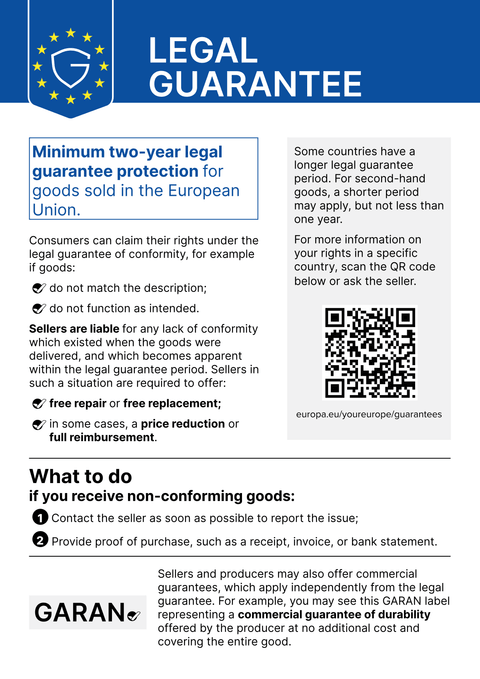
Setup in Shopware 5
This is how setup works after launch.
- 1
Install the plugin
In the Plugin Manager, upload the ZIP file (on request, later also from the store), then install and activate it. Afterwards, clear the theme cache.
- 2
Configure
In the plugin configuration, choose the notice locations for each shop.
- 3
Maintain products
In the product, fill in the free-text fields for GARAN years, Brand and Model, or define rules by manufacturer and category (category rules also cover subcategories).
- 4
Check
Open the product page, basket and order confirmation page.
What Garanify does in Shopware 5
- Notice on the product page, in the basket and on the order confirmation page
- GARAN label, large or nested
- Free-text fields on the product, rules by manufacturer and category
- Configurable per shop or subshop
Questions about Shopware 5
Shopware 5 is no longer being developed. Is it worth it?
As long as your shop sells to consumers, the obligation applies. Garanify for Shopware 5 is lean and changes nothing in your theme, which makes it ideal until you move to Shopware 6.
Guides and articles for Shopware 5
All Shopware 5 help articles-
 Blog
Legal guarantee notice in Shopware 5: how to add it (2026)
To add the mandatory EU notice on the legal guarantee in Shopware 5, Garanify is planned as a plugin: once it is listed in the Shopware Store, you install it, switch the notice on, choose the places (product page, cart, checkout) and check the shop. The plugin is in preparation and not yet in the Shopware Store. The GARAN label is added only for a manufacturer guarantee of more than 2 years.
2 min read
-
 Help
Set up Garanify in Shopware 5
Install and set up Garanify in Shopware 5: Plugin Manager, Settings > Garanify, the setup guide and a check in the shop.
-
 Help
Show and place the notice in Shopware 5
Switch on the legal guarantee notice in Shopware 5 and choose its places: product page, cart, checkout and order completed page.
Other platformsComing soon
The notice and the GARAN label, from your product data.
Choose your shop system or let us set it up: €99, one year of Pro included.