

Garanify for Shopify
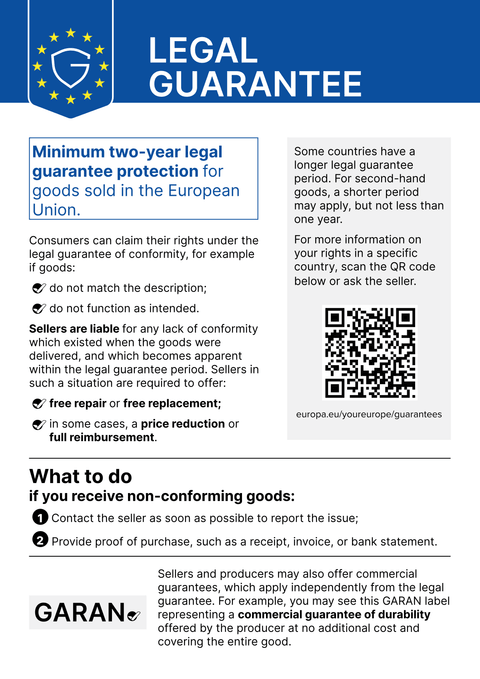
Garanify for Shopify adds the notice and the GARAN label to your theme as app blocks, with no code and without changing the theme. The basket, including the slide-out cart, is covered by an app embed.
Coming soonWrite to us and we will let you know at launch.hello@qadsoft.dev
Setup in Shopify
This is how setup works after launch.
- 1
Install the app
Once Garanify is in the Shopify App Store: open the app and click Install. The app only asks for the permissions it needs for products and settings.
- 2
Activate the app embed
In the app, click Open in theme editor. The app embed Garanify is preselected, so save. This makes the notice appear in the basket and in the slide-out cart.
- 3
Blocks on the product page
Place the Legal guarantee notice and GARAN label blocks in the product template, ideally below the buy button or next to the product image.
- 4
Create GARAN rules
Under Rules, assign guarantee years by vendor, tag or product type, or individually on the product. Brand and model come from the vendor and SKU.
- 5
Check
Open the shop in a second language: the notice switches automatically. Done.
What Garanify does in Shopify
- Notice as an app block on the product page and in the basket, app embed for the slide-out cart
- GARAN label as an app block, large or nested
- Rules by vendor, tag or product type, and bulk assignment in the product list
- A hint in the theme editor when details are missing
- Graphics served from the Shopify CDN, no external requests
Questions about Shopify
Does Garanify show the notice at the Shopify checkout?
No. Garanify has no checkout extension, and Shopify only allows extensions before the checkout's order button on Shopify Plus. Garanify shows the notice in the basket and in the slide-out cart, which is also before the contract is concluded.
Will my theme be changed?
No. Shopify only allows apps to use theme app extensions. You can move or remove the blocks in the theme editor, and nothing is left behind when you uninstall.
Where does Garanify get the model from?
Shopify has no MPN field of its own. Garanify therefore uses the SKU of the selected variant or the model you enter on the product, never the barcode.
Guides and articles for Shopify
All Shopify help articles-
 Blog
Legal guarantee notice in Shopify: how to add it (2026)
To add the mandatory EU notice on the legal guarantee in Shopify, Garanify is planned as a Shopify app: once it is listed in the Shopify App Store, you install it, switch the notice on and place it on the product page and in the cart. The app is in preparation and not yet in the App Store. The GARAN label is added only for a manufacturer guarantee of more than 2 years.
2 min read
-
 Help
Create GARAN rules in Shopify
Producer guarantee for many products at once: create, sort and test GARAN rules by vendor, product type or tag in Shopify.
-
 Help
Free and Pro plans in Shopify
What Free and Pro include in Garanify for Shopify, how to change plans and what happens to labels and rules when you switch.
Other platformsComing soon
The notice and the GARAN label, from your product data.
Choose your shop system or let us set it up: €99, one year of Pro included.