

Garanify for Squarespace
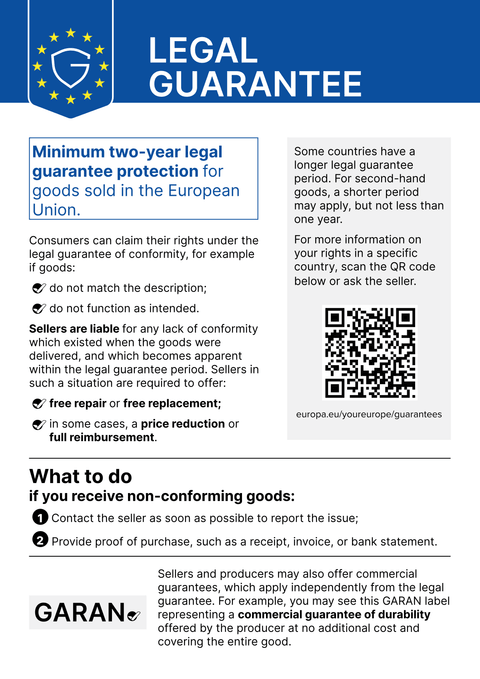
For Squarespace Commerce, the snippet inserts the notice on product pages and in the basket.
Coming soonWrite to us and we will let you know at launch.hello@qadsoft.dev
Setup in Squarespace
This is how setup works after launch.
- 1
Open Code Injection
Open Settings › Advanced › Code Injection.
- 2
Insert the snippet
Paste the snippet into the Footer field and save.
- 3
Check the basket
If your template's basket sits in a sidebar, you may need to give a selector for the basket.
- 4
Check
Open the product page and the basket.
Your snippet
<script src="https://cdn.garanify.com/v1/garanify.min.js" defer
        data-lang="auto" data-places="product,cart,checkout"></script>
You will receive the final CDN address at launch. Options such as data-places and rules are in the guide.
What Garanify does in Squarespace
- Notice on the legal guarantee in 24 languages, with the language taken from the page or set explicitly
- Detects product pages through structured data (JSON-LD Product) and basket/checkout through the URL
- GARAN label by brand rule or via a placeholder on the product, large or nested
- Works with single-page shops: new content is detected automatically
- Rendered in the Shadow DOM, so it does not affect your theme
Questions about Squarespace
What if the snippet can't find the order button?
Themes differ from one another. In that case, give a CSS selector for the product or basket area in the configuration, or place the placeholder <div data-gfy="notice"></div> exactly where the notice should appear.
Do I need a particular plan for the snippet?
With some shop builders, inserting your own code is only possible on paid plans. Please check this on your plan before you buy Pro.
What data does the snippet load?
Only the notice graphic, the GARAN template and the Inter typeface, from our CDN, with no cookies and no tracking.
Guides and articles for Squarespace
All Squarespace help articles-
 Blog
Legal guarantee notice in Squarespace: how to add it (2026)
To add the mandatory EU notice on the legal guarantee in Squarespace, add the Garanify snippet, switch the notice on, choose the places (product page, cart) and check the shop. The GARAN label is added only for a manufacturer guarantee of more than 2 years.
2 min read
-
 Help
Add Garanify to Squarespace
Add the legal guarantee notice to Squarespace with the Garanify snippet: requirements, where the code goes, and a check.
-
 Help
Place the notice in Squarespace
Where the Garanify snippet inserts the notice in Squarespace, which places are possible and how to set the spot with placeholders.
Other platformsComing soon
The notice and the GARAN label, from your product data.
Choose your shop system or let us set it up: €99, one year of Pro included.