

Garanify voor Shopware 5
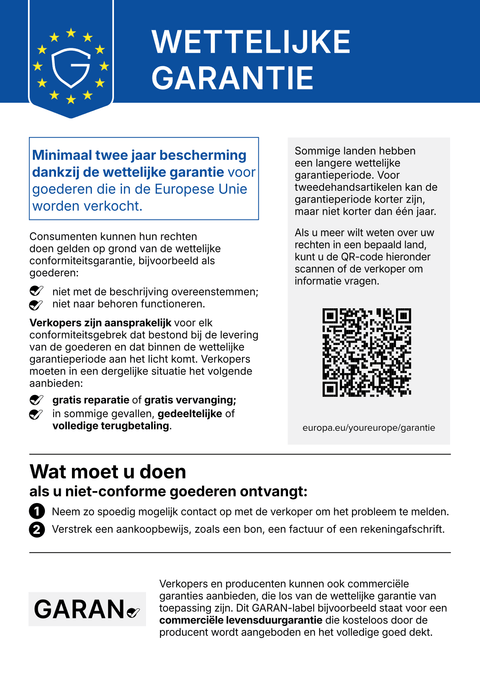
Veel winkels draaien nog op Shopware 5. Garanify brengt de mededeling en het GARAN-label ook daar, met vrije tekstvelden bij het product en regels.
BinnenkortSchrijf ons en wij laten het u weten bij de lancering.hello@qadsoft.dev
Instellen in Shopware 5
Zo werkt het instellen na de lancering.
- 1
Plug-in installeren
Upload het ZIP-bestand in de Plugin Manager (op aanvraag, later ook uit de store), installeer en activeer het. Maak daarna de themacache leeg.
- 2
Configure
Kies in de plug-inconfiguratie per winkel de locaties van de mededeling.
- 3
Producten bijhouden
Vul in het product de vrije tekstvelden voor GARAN-jaren, Merk en Model in, of definieer regels per fabrikant en categorie (categorieregels dekken ook subcategorieën).
- 4
Check
Open de productpagina, het winkelmandje en de orderbevestigingspagina.
Wat Garanify doet in Shopware 5
- Mededeling op de productpagina, in het winkelmandje en op de orderbevestigingspagina
- GARAN-label, groot of ingeklapt
- Vrije tekstvelden op het product, regels per fabrikant en categorie
- Instelbaar per winkel of subwinkel
Vragen over Shopware 5
Shopware 5 wordt niet meer doorontwikkeld. Is het de moeite waard?
Zolang uw winkel aan consumenten verkoopt, geldt de verplichting. Garanify voor Shopware 5 is licht en wijzigt niets aan uw thema, wat ideaal is tot u naar Shopware 6 overstapt.
Handleidingen en artikelen voor Shopware 5
Alle hulpartikelen voor Shopware 5-
 Blog
Legal guarantee notice in Shopware 5: how to add it (2026)
To add the mandatory EU notice on the legal guarantee in Shopware 5, Garanify is planned as a plugin: once it is listed in the Shopware Store, you install it, switch the notice on, choose the places (product page, cart, checkout) and check the shop. The plugin is in preparation and not yet in the Shopware Store. The GARAN label is added only for a manufacturer guarantee of more than 2 years.
2 min leestijd
-
 Hulp
Set up Garanify in Shopware 5
Install and set up Garanify in Shopware 5: Plugin Manager, Settings > Garanify, the setup guide and a check in the shop.
-
 Hulp
Show and place the notice in Shopware 5
Switch on the legal guarantee notice in Shopware 5 and choose its places: product page, cart, checkout and order completed page.
Andere platformsBinnenkort
De mededeling en het GARAN-label, op basis van uw productgegevens.
Kies uw winkelsysteem of laat ons het instellen: € 99, een jaar Pro inbegrepen.