

Shopware 5 Plugin
Set up Garanify in Shopware 5
Last updated 18 November 2026
In short
After installing in the Plugin Manager you open Garanify under Settings > Garanify. The setup guide on the Overview tab checks theme, places, languages and GARAN details and shows what is still open. The notice is switched on right away.
Step by step
-
1. Request the ZIP file
Request the ZIP file of the pre-release version (on request, until it is published in the store).
-
2. Install
Upload the ZIP in the Plugin Manager, install and activate it, clear the theme cache.
-
3. Open
Open Settings > Garanify in the backend and choose the shop if needed.
-
4. Work through the guide
Fix open items on the Overview with their buttons.
-
5. Check
Click Check again and look at a product page and the cart in your shop.
Requirements
- Shopware 5.6 or 5.7, PHP 7.4 or newer
- Responsive theme or a theme derived from it
Install
Upload the ZIP file in the Plugin Manager, install and activate the plugin. Then clear the theme cache under Settings > Caches/performance.
Open Garanify
Garanify is in the backend under Settings > Garanify. A window opens with the tabs Overview, Preview, GARAN rules, Products and Settings. With several shops, choose the Shop at the top left. All settings apply per shop.
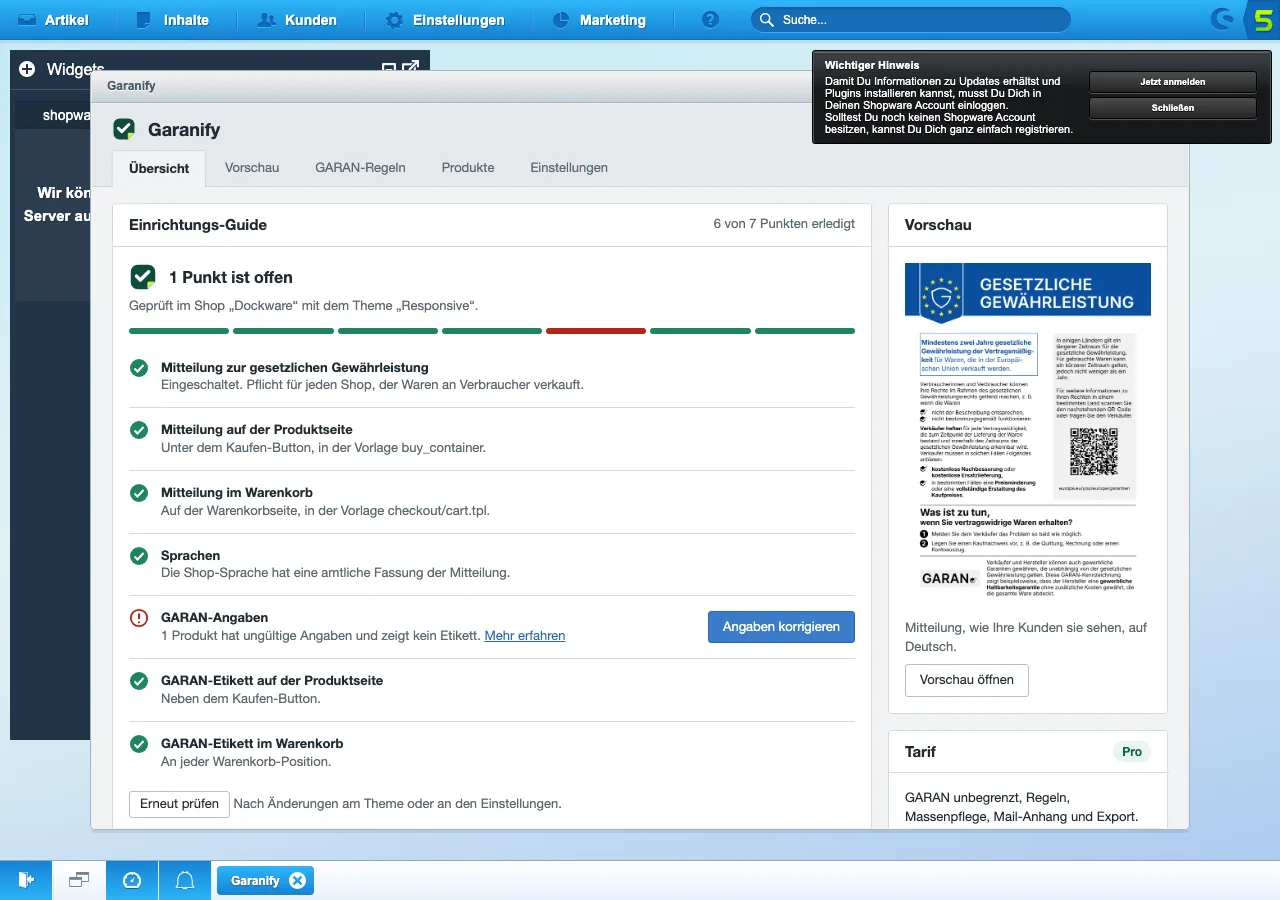
The setup guide
The overview sums up the status in one heading, such as “2 items are open” or “Your shop shows the required information”. Below it reads “Checked in shop “Demo” with the theme “Responsive”.”
| Item | Done when |
|---|---|
| Notice on the legal guarantee | the notice is switched on |
| Notice on the product page | the buy_container template contains the Garanify block |
| Notice in the cart | the checkout/cart.tpl template contains the Garanify block |
| Languages | all shop languages have an official version |
| GARAN details | no product has invalid details |
Open items have a button such as Adjust places or Fix details. After changes, click Check again.
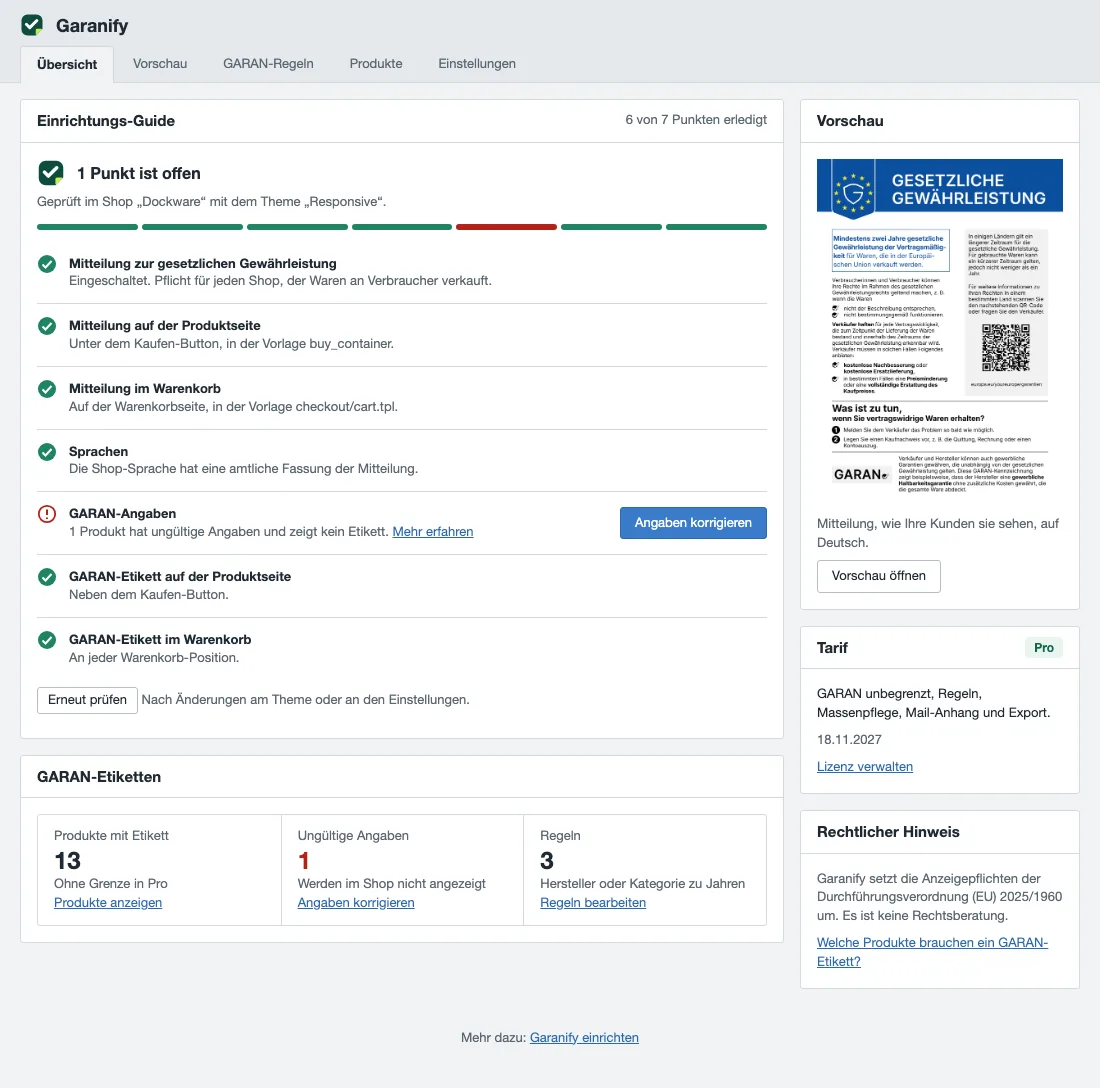
Garanify implements the display requirements of Implementing Regulation (EU) 2025/1960. It is not legal advice.
Related questions
Which Shopware 5 versions are supported?
Shopware 5.6 and 5.7 with PHP 7.4 or newer.
Does Garanify change my theme?
No. Garanify extends Smarty blocks of the templates. If your theme replaces a template completely, the guide tells you.
Do I need a GARAN label?
Only if the producer gives more than 2 years of durability guarantee on the whole product at no extra cost. Every shop needs the notice.
Which backend languages are available?
German and English. Other backend languages show English.
Sources
Was this article helpful?
What was missing? Send us a short note and we will add it to the article. Send feedback by email
Your choice is not stored or sent anywhere.
Thank you for your feedback. What was missing? Send us a short note and we will add it to the article. Send feedback by email