

Garanify voor Shopware 6
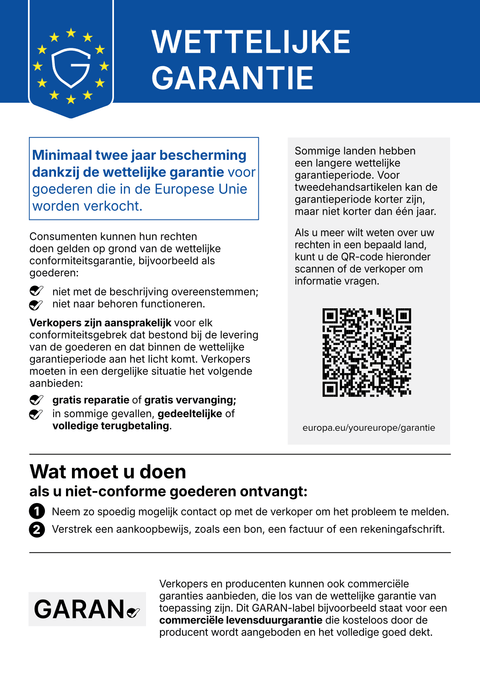
Voor Shopware 6 breidt Garanify de storefront uit met de mededeling en het GARAN-label en voegt het eigen velden bij het product toe, geschikt voor meerdere verkoopkanalen en talen.
BinnenkortSchrijf ons en wij laten het u weten bij de lancering.hello@qadsoft.dev
Instellen in Shopware 6
Zo werkt het instellen na de lancering.
- 1
Plug-in installeren
Zodra de plugin in de Shopware Store staat: voeg Garanify toe. Tot dan is het ZIP-bestand op aanvraag beschikbaar; u kunt het uploaden onder Extensies › Mijn extensies. Installeer en activeer het daarna.
- 2
Configure
Stel in de plug-inconfiguratie per verkoopkanaal in waar de mededeling verschijnt: productpagina, winkelmandje, kassa.
- 3
Producten bijhouden
Vul bij het product de eigen velden GARAN-jaren, Merk en Model in, of definieer regels per fabrikant en categorie.
- 4
Check
Open de storefront in een tweede taal: de mededeling volgt de taal van het verkoopkanaal.
Wat Garanify doet in Shopware 6
- Mededeling in de taal van het verkoopkanaal
- GARAN-label op de productpagina, ingeklapt in het winkelmandje en bij het afrekenen
- Eigen velden bij het product, regels per fabrikant en categorie
- Configuratie per verkoopkanaal
Vragen over Shopware 6
Shopware plant een eigen oplossing. Heb ik Garanify dan nog nodig?
Shopware heeft een integratie in de kern aangekondigd. Zolang die er niet is, en als u regels, meerdere winkels of Agency-licenties nodig heeft, is Garanify de snelle oplossing.
Hoe verloopt de facturering?
Het abonnement Free kost niets. Pro kost € 2,99 per maand of € 24 per jaar.
Handleidingen en artikelen voor Shopware 6
Alle hulpartikelen voor Shopware 6-
 Blog
Legal guarantee notice in Shopware 6: how to add it (2026)
To add the mandatory EU notice on the legal guarantee in Shopware 6, Garanify is planned as a plugin: once it is listed in the Shopware Store, you install it, switch the notice on, choose the places (product page, cart, checkout) and check the shop. The plugin is in preparation and not yet in the Shopware Store. The GARAN label is added only for a manufacturer guarantee of more than 2 years.
2 min leestijd
-
 Hulp
Set up Garanify in Shopware 6
Install Garanify in Shopware 6 and check it with the setup guide: notice, cart, languages and GARAN details in a few minutes.
-
 Hulp
Place the notice in Shopware 6
Where Garanify shows the notice in Shopware 6: product page, off-canvas cart, cart, checkout and order completed page. Switch places and check them.
Andere platformsBinnenkort
De mededeling en het GARAN-label, op basis van uw productgegevens.
Kies uw winkelsysteem of laat ons het instellen: € 99, een jaar Pro inbegrepen.