

Garanify para Shopware 6
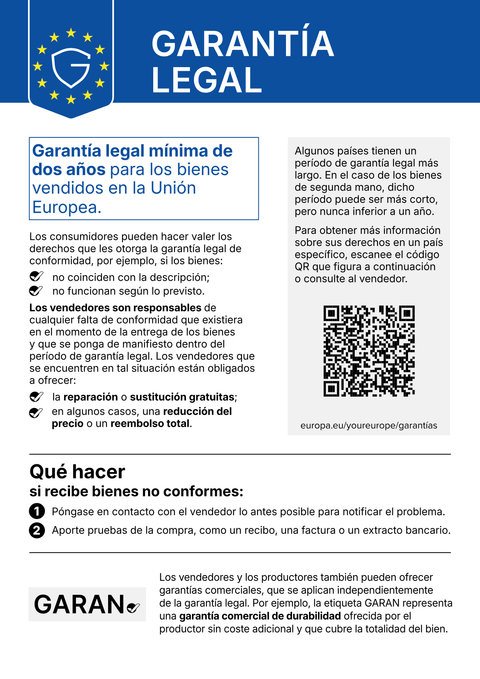
En Shopware 6, Garanify amplía el Storefront con el aviso y la etiqueta GARAN y añade campos personalizados en el producto, adecuados para varios canales de venta e idiomas.
PróximamenteEscríbanos y le avisaremos en el lanzamiento.hello@qadsoft.dev
Configuración en Shopware 6
Así funciona la configuración tras el lanzamiento.
- 1
Instalar el plugin
Cuando el plugin esté en la Shopware Store: añada Garanify. Hasta entonces, el archivo ZIP está disponible previa solicitud; puede subirlo en Extensiones › Mis extensiones. Después instálelo y actívelo.
- 2
Configurar
En la configuración del plugin, defina por canal de venta dónde aparece la mención: página de producto, cesta, pago.
- 3
Mantener los productos
En el producto, rellene los campos personalizados Años GARAN, Marca y Modelo, o defina reglas por fabricante y categoría.
- 4
Comprobar
Abra el escaparate en un segundo idioma: la mención sigue el idioma del canal de venta.
Qué hace Garanify en Shopware 6
- Aviso en el idioma del canal de venta
- Etiqueta GARAN en la página de producto, anidada en la cesta y en el pago
- Campos personalizados en el producto, reglas por fabricante y categoría
- Configuración por canal de venta
Preguntas sobre Shopware 6
Shopware planea su propia solución. ¿Seguiré necesitando Garanify?
Shopware ha anunciado una integración en el núcleo. Hasta que esté disponible, y si necesita reglas, varias tiendas o licencias Agency, Garanify es la solución rápida.
¿Cómo se gestiona la facturación?
El plan Free no cuesta nada. Pro cuesta 2,99 € al mes o 24 € al año.
Guías y artículos para Shopware 6
Todos los artículos de ayuda de Shopware 6-
 Blog
Legal guarantee notice in Shopware 6: how to add it (2026)
To add the mandatory EU notice on the legal guarantee in Shopware 6, Garanify is planned as a plugin: once it is listed in the Shopware Store, you install it, switch the notice on, choose the places (product page, cart, checkout) and check the shop. The plugin is in preparation and not yet in the Shopware Store. The GARAN label is added only for a manufacturer guarantee of more than 2 years.
2 min de lectura
-
 Ayuda
Set up Garanify in Shopware 6
Install Garanify in Shopware 6 and check it with the setup guide: notice, cart, languages and GARAN details in a few minutes.
-
 Ayuda
Place the notice in Shopware 6
Where Garanify shows the notice in Shopware 6: product page, off-canvas cart, cart, checkout and order completed page. Switch places and check them.
Otras plataformasPróximamente
La mención y la etiqueta GARAN, a partir de los datos de sus productos.
Elija su sistema de tienda o deje que lo configuremos nosotros: 99 €, un año de Pro incluido.