

Garanify voor JTL-Shop 5
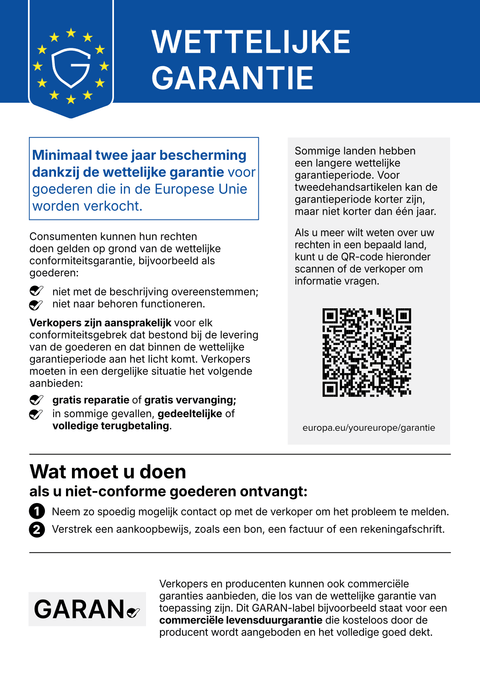
Bij JTL-Shop 5 beheert u de garantiegegevens waar u al werkt: als functieattributen in JTL-Wawi. Garanify gebruikt ze om de mededeling en het GARAN-label in het NOVA-sjabloon te tonen.
BinnenkortSchrijf ons en wij laten het u weten bij de lancering.hello@qadsoft.dev
Instellen in JTL-Shop 5
Zo werkt het instellen na de lancering.
- 1
Plug-in installeren
Upload de plugin (ZIP op aanvraag) in de shop-backend onder Plugins › Pluginmanager. Zodra zij in de Extension Store staat, kunt u haar ook daar installeren. Activeer haar daarna.
- 2
Locaties kiezen
Stel in de plug-ininstellingen in waar de mededeling verschijnt: productpagina, winkelmandje, kassa vóór de bestelknop, orderbevestiging.
- 3
Gegevens bijhouden in Wawi
Stel bij het product de functieattributen
garanify_jahre, optioneelgaranify_markeengaranify_modellin en synchroniseer ze, of definieer regels zoalsHersteller=Miele;10. - 4
Check
Open na het synchroniseren de productpagina: het GARAN-label verschijnt als de gegevens geldig zijn.
Wat Garanify doet in JTL-Shop 5
- Mededeling in 24 talen, winkeltaal automatisch herkend
- GARAN-label uit functieattributen in JTL-Wawi
- Regels per fabrikant of categorie, één per regel
- Model standaard uit het HAN, anders de SKU
Vragen over JTL-Shop 5
Moet ik elk product afzonderlijk bijhouden?
Nee. Met regels zoals Hersteller=Bosch;5 geldt één garantieduur voor alle producten van een fabrikant. Attributen bij het product hebben voorrang.
Welke sjablonen worden ondersteund?
Het NOVA-sjabloon vanaf JTL-Shop 5.2. Van NOVA afgeleide child-sjablonen zouden ook moeten werken, maar controleer dit voordat u live gaat.
Handleidingen en artikelen voor JTL-Shop 5
Alle hulpartikelen voor JTL-Shop 5-
 Blog
Legal guarantee notice in JTL-Shop 5: how to add it (2026)
To add the mandatory EU notice on the legal guarantee in JTL-Shop 5, Garanify is planned as a plugin: once it is listed in the JTL Extension Store, you install it, switch the notice on, choose the places (product page, cart, checkout) and check the shop. The plugin is in preparation and not yet in the JTL Extension Store. The GARAN label is added only for a manufacturer guarantee of more than 2 years.
2 min leestijd
-
 Hulp
Set up Garanify in JTL-Shop 5
Install and set up Garanify in JTL-Shop 5: Plugin Manager, installed plugins, the setup guide and a check in the NOVA template.
-
 Hulp
Show and place the notice in JTL-Shop 5
Switch on the legal guarantee notice in JTL-Shop 5 and choose its placements: product page, cart, checkout and order confirmation.
Andere platformsBinnenkort
De mededeling en het GARAN-label, op basis van uw productgegevens.
Kies uw winkelsysteem of laat ons het instellen: € 99, een jaar Pro inbegrepen.