

Garanify, skirta Squarespace
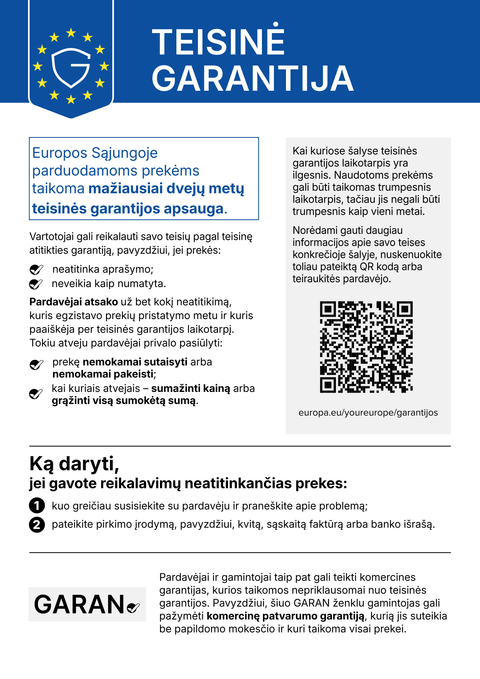
Squarespace Commerce snippet įterpia pranešimą produkto puslapiuose ir krepšelyje.
NetrukusParašykite mums, o paleidimo metu jums pranešime.hello@qadsoft.dev
Nustatymas platformoje Squarespace
Taip nustatymas vyksta po paleidimo.
- 1
Atidarykite Code Injection
Atidarykite Settings › Advanced › Code Injection.
- 2
Įterpkite snippet
Įklijuokite snippet į lauką Footer ir išsaugokite.
- 3
Patikrinkite krepšelį
Jei jūsų šablono krepšelis yra šoninėje juostoje, gali tekti nurodyti krepšelio selektorių.
- 4
Check
Atidarykite produkto puslapį ir krepšelį.
Jūsų snippet
<script src="https://cdn.garanify.com/v1/garanify.min.js" defer
        data-lang="auto" data-places="product,cart,checkout"></script>
Galutinį CDN adresą gausite paleidimo metu. Parinktys, pvz., data-places ir taisyklės, aprašytos vadove.
Ką Garanify daro sistemoje Squarespace
- Pranešimas apie teisinę garantiją 24 kalbomis, kalba paimama iš puslapio arba nustatoma aiškiai
- Atpažįsta produkto puslapius pagal struktūrizuotus duomenis (JSON-LD Product), o krepšelį ir apmokėjimą pagal URL
- GARAN etiketė pagal prekių ženklo taisyklę ar vietos žymeklį gaminyje, didelė arba įterpta
- Veikia su vieno puslapio parduotuvėmis: naujas turinys aptinkamas automatiškai
- Atvaizduojama Shadow DOM, todėl jūsų temos neveikia
Klausimai apie Squarespace
Ką daryti, jei snippet neranda užsakymo mygtuko?
Temos skiriasi viena nuo kitos. Tokiu atveju konfigūracijoje nurodykite CSS selektorių produkto ar krepšelio sričiai arba įdėkite vietos žymeklį <div data-gfy="notice"></div> tiksliai ten, kur turi būti pranešimas.
Ar snippet reikia konkretaus plano?
Kai kuriuose parduotuvių kūrėjuose savo kodą įterpti galima tik mokamuose planuose. Prieš pirkdami Pro, patikrinkite tai savo plane.
Kokius duomenis kraunasi snippet?
Tik pranešimo grafiką, GARAN šabloną ir Inter šriftą iš mūsų CDN, be slapukų ir sekimo.
Vadovai ir straipsniai platformai Squarespace
Visi Squarespace pagalbos straipsniai-
 Tinklaraštis
Legal guarantee notice in Squarespace: how to add it (2026)
To add the mandatory EU notice on the legal guarantee in Squarespace, add the Garanify snippet, switch the notice on, choose the places (product page, cart) and check the shop. The GARAN label is added only for a manufacturer guarantee of more than 2 years.
2 min. skaitymo
-
 Pagalba
Add Garanify to Squarespace
Add the legal guarantee notice to Squarespace with the Garanify snippet: requirements, where the code goes, and a check.
-
 Pagalba
Place the notice in Squarespace
Where the Garanify snippet inserts the notice in Squarespace, which places are possible and how to set the spot with placeholders.
Kitos platformosNetrukus
Pranešimas ir GARAN etiketė iš Jūsų duomenų.
Pasirinkite savo parduotuvės sistemą arba leiskite mums ją sukonfigūruoti: 99 €, vieni metai Pro įskaičiuoti.