

WooCommerce Plugin
Set up Garanify in WooCommerce
Last updated 18 November 2026
In short
Install Garanify like any WordPress plugin, then open WooCommerce > Garanify. The setup guide on the overview checks the product template and the cart and shows what is still missing. The notice is on after activation, and in WooCommerce the GARAN label is free without a product limit.
Step by step
-
1. Request the ZIP file
Request the ZIP file of the pre-release version (on request, until it is published in the store).
-
2. Upload the plugin
In WordPress open Plugins > Add New Plugin, choose Upload Plugin and upload the ZIP file.
-
3. Activate
Activate “Garanify – EU Legal Guarantee & GARAN Label” under Plugins.
-
4. Open the overview
Open WooCommerce > Garanify. The setup guide checks your shop right away.
-
5. Resolve open items
Resolve each open item with its button, then click Check again.
-
6. Look at the shop
Open a product page and the cart. The notice sits above the add to cart button and in the cart.
Requirements
- WordPress 6.4 or later, PHP 7.4 or later
- WooCommerce 8.0 or later, active. Without WooCommerce the plugin reports “Garanify requires WooCommerce to be active.”
- A user who may manage WooCommerce (shop manager or administrator)
The setup guide
WooCommerce > Garanify opens the Overview. At the top is the Setup guide with a counter such as “6 of 8 items done” and the theme it checked.
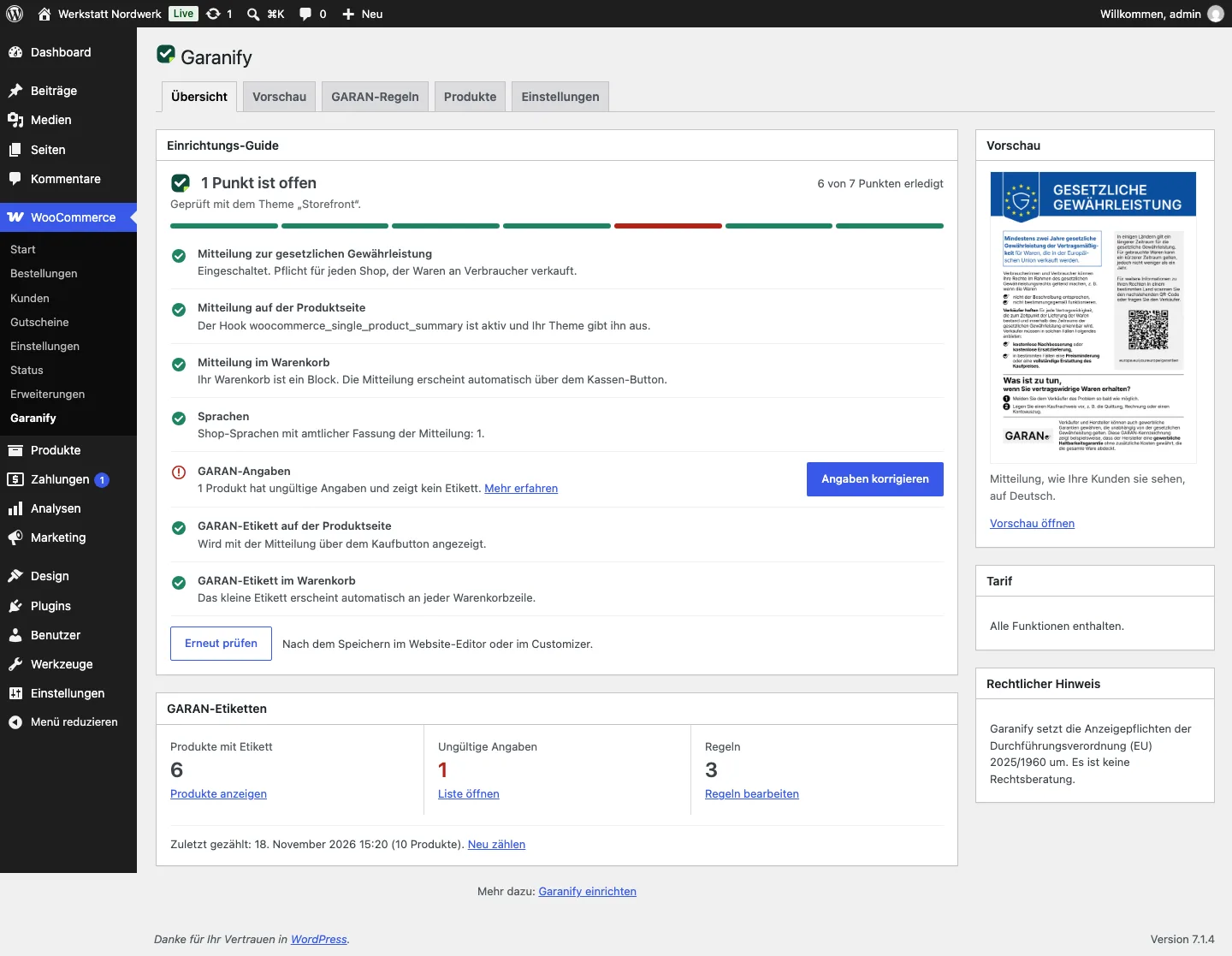
| Item | What is checked |
|---|---|
| Notice on the legal guarantee | Is the notice switched on? |
| Notice on the product page | Does the product template contain the add to cart block (block theme), or does your theme render the hook woocommerce_single_product_summary (classic theme)? |
| Notice in the cart | Is your cart a block or the classic cart? |
| Languages | Do your shop languages have an official version? Also detects WPML and Polylang. |
| GARAN data, GARAN rules, GARAN label | Only shown when products or rules with years exist |
Open items have a button with the fix and a Learn more link. After changes in the site editor or the customizer, click Check again.
Do you need a GARAN label?
Every shop that sells goods to consumers needs the notice. Only products with a free producer guarantee of more than 2 years need the GARAN label. The four conditions are explained in GARAN label: when is it required?.
Areas of Garanify
Garanify has five tabs: Overview, Preview, GARAN rules, Products and Settings. The License card is in the settings.
Garanify implements the display requirements of Implementing Regulation (EU) 2025/1960. It is not legal advice.
Related questions
Do I have to switch anything on after activating?
No. The notice is on for product page, cart, checkout and order confirmation. The guide shows whether your theme renders it.
Does Garanify work with block themes and the cart block?
Yes. Garanify detects block themes and the cart and checkout blocks and attaches to the right blocks there.
Is there a limit of 25 products in WooCommerce?
No. In WooCommerce the GARAN label is free without a product limit.
Do I need a Garanify account?
No. The plugin runs without an account. You only need one for a Pro licence.
Sources
Was this article helpful?
What was missing? Send us a short note and we will add it to the article. Send feedback by email
Your choice is not stored or sent anywhere.
Thank you for your feedback. What was missing? Send us a short note and we will add it to the article. Send feedback by email