

WooCommerce Plugin
GARAN label in WooCommerce: details per product
Last updated 18 November 2026
In short
In WooCommerce you enter the producer guarantee on the product in the General tab under “Garanify (GARAN label)”. Without an entry, brand and model come from the brand taxonomy and the SKU. The Products tab shows which products have a label and changes many at once.
The fields on the product
Open the product and choose the General tab under Product data. The group Garanify (GARAN label) has:
| Field | Meaning |
|---|---|
| Producer guarantee (years) | Free producer guarantee of more than 2 years, whole or half years. Leave empty to use the rules. |
| Brand | Empty: brand taxonomy or the configured attribute |
| Model | Empty: MPN (if configured in the settings) or SKU |
| No GARAN label | Never show a GARAN label for this product |
Variations have their own fields GARAN years (empty: from product), GARAN brand and GARAN model. If the details are invalid, the product shows Invalid data: with the reason.
The Products tab
Under WooCommerce > Garanify > Products filter by All, With label, Invalid and Without label. The number after each filter shows how many products it holds.
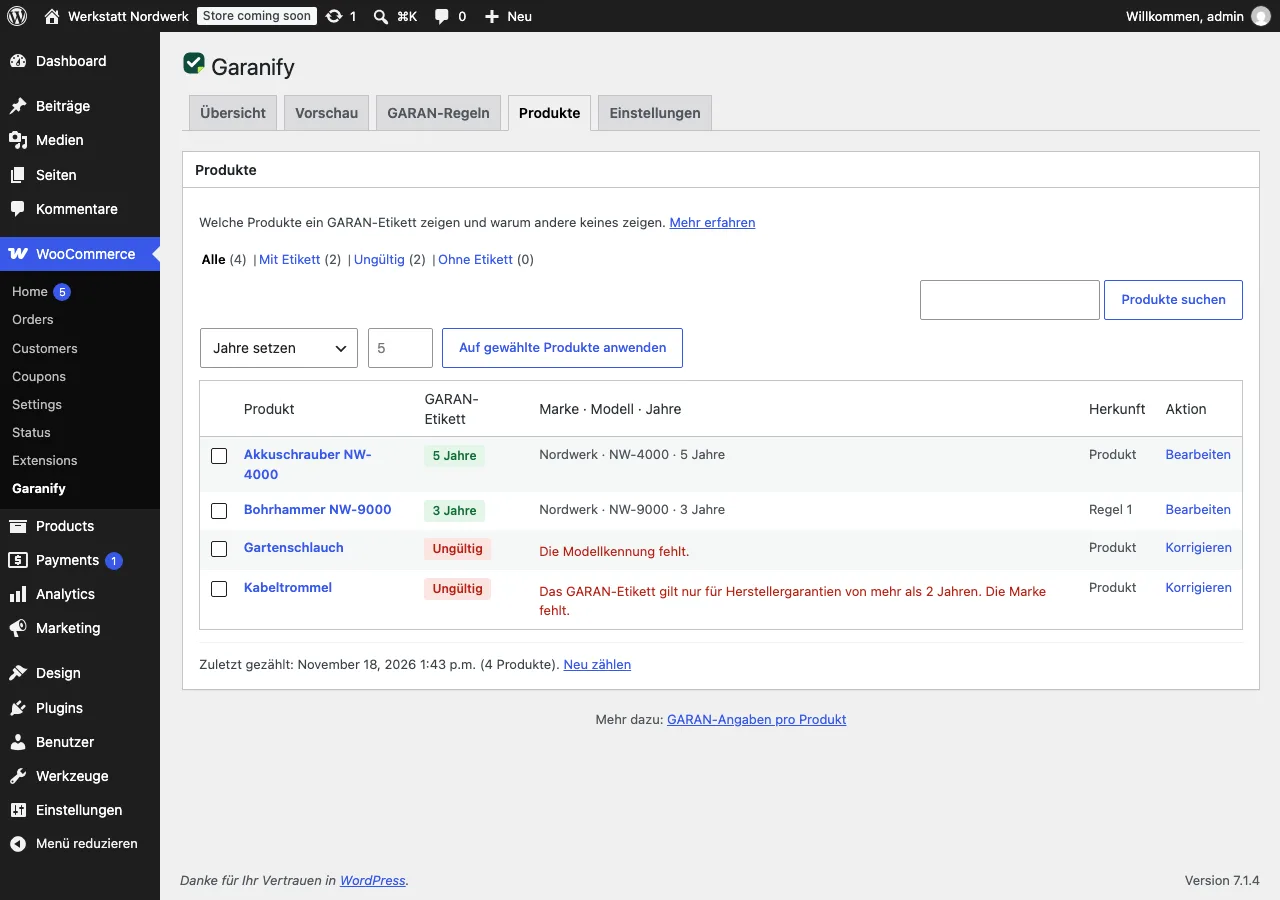
Each row shows the label, Brand · Model · Years and the source. Correct opens the product.
Many products at once
Select products, then under Bulk action:
- Set years: enters the years and clears “No GARAN label”
- Hide label and Show label
- Reset: clears years, brand, model and the exclusion
Apply to selected products runs the action.
Export evidence
Export evidence (CSV) above the list downloads a file: one row per shop language for the notice, with the places switched on and the time since when it has been active that way, and one row per product with GARAN data: SKU, brand, model, years, source and status (active, invalid with reason, hidden). Keep the file as evidence. As with bulk editing, the export is part of Pro in the edition from garanify.com.
Reasons for “Invalid”
- “Guarantee duration is missing.”
- “The GARAN label is only for producer guarantees of more than 2 years.”
- “Only whole or half years are allowed.”
- “Brand is missing.” or “Model identifier is missing.”
Where brand and model come from otherwise is set in the settings with Brand attribute and MPN attribute or meta key. Garanify never uses the EAN as model. More in Brand and model on the GARAN label.
Related questions
Is there a limit for products with a label?
No. In WooCommerce any number of products can show a GARAN label, also without Pro.
Where does the brand come from if I enter nothing?
From the configured brand attribute, otherwise from the WooCommerce brand taxonomy.
Why does a product with 5 years show no label?
Usually the brand or model is missing. The Products tab names the reason in the row.
Is the EAN used as model?
No. Without model and MPN, Garanify uses the SKU, never the EAN.
Sources
Was this article helpful?
What was missing? Send us a short note and we will add it to the article. Send feedback by email
Your choice is not stored or sent anywhere.
Thank you for your feedback. What was missing? Send us a short note and we will add it to the article. Send feedback by email