

Shopify App
Reading the Garanify overview in Shopify
Last updated 18 November 2026
In short
The overview shows the setup guide at the top: it checks the published theme and your products and tells you whether the shop shows the required information. Below are the key figures for GARAN labels; on the right are preview, plan and the legal note.
The setup guide
The heading sums up the status: “3 items need your attention” or “Your shop shows the required information”. Next to it is the counter, such as “4 of 7 items done”, and below it “Checked in your published theme “Dawn”.”
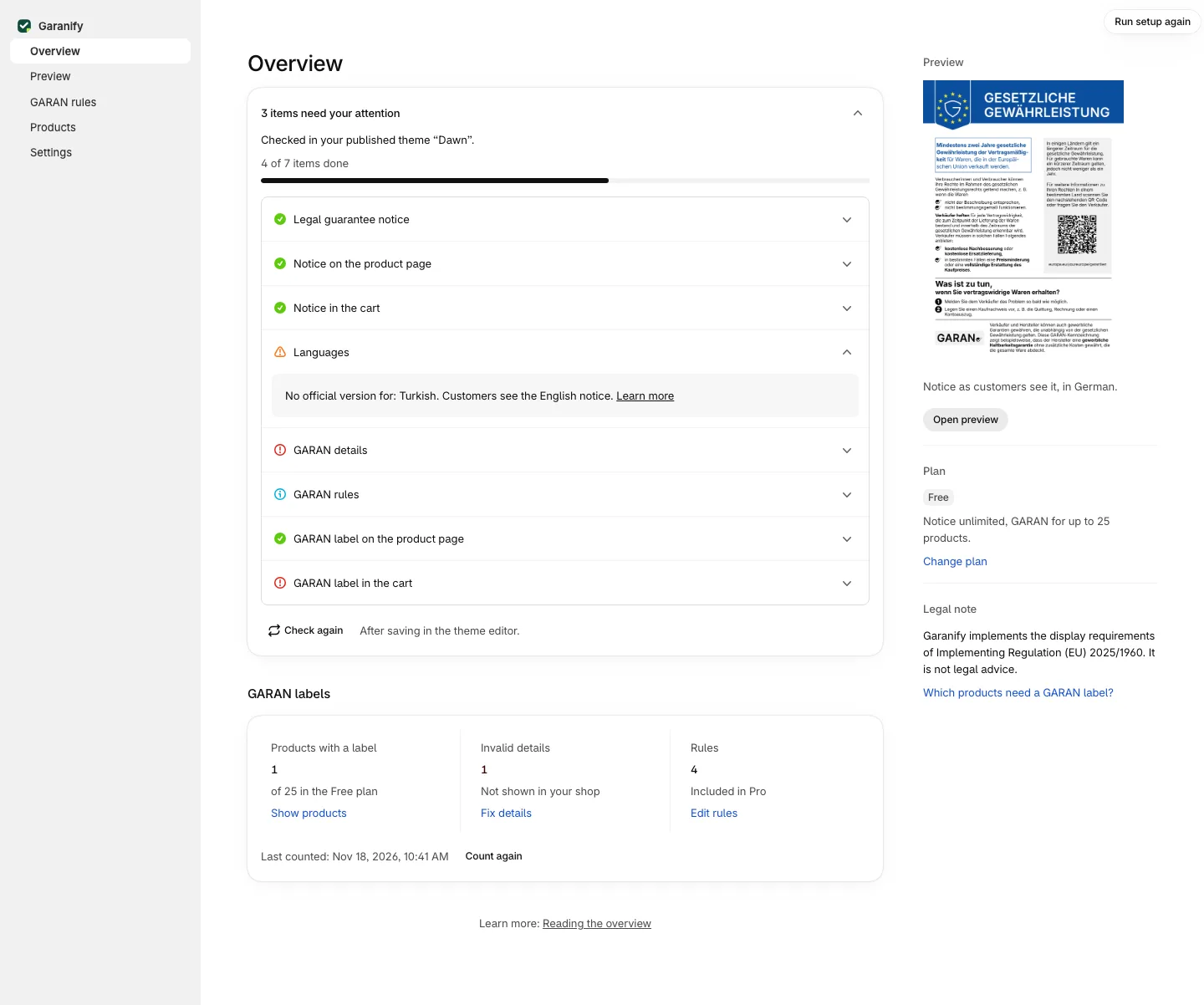
| Item | Done when |
|---|---|
| Legal guarantee notice | the notice is switched on |
| Notice on the product page | the app block is in the product template |
| Notice in the cart | the app embed is active or the app block is in the cart template |
| Languages | all shop languages have an official version |
| GARAN details | no product has invalid details |
| GARAN label on the product page | the app block GARAN label is in the product template |
| GARAN label in the cart | the app embed is active |
The two label items only appear when products have details or rules are active. If no product has more than 2 years of producer guarantee, the guide shows an info line instead.
States
- Done: green check mark.
- Open: red, with a button to fix it, such as Add in theme editor or Activate app embed.
- Note: amber, for example “Only shown at the end of the page. Add the app block near the buy button.”
- Could not be checked: grey. Garanify could not read the theme. Check in the theme editor. It does not count as an error.
After saving in the theme editor, click Check again. When all items are done the list collapses; Show completed items opens it again.
Key figures “GARAN labels”
Three columns: Products with a label (in the Free plan “of 25 in the Free plan”), Invalid details and Rules. Counting runs in the background. Count again restarts it; “Last counted” shows date and time.
Sidebar
- Preview: the notice in the primary language, with Open preview
- Plan: Free or Pro, with Change plan
- Legal note: “Garanify implements the display requirements of Implementing Regulation (EU) 2025/1960. It is not legal advice.”
Related questions
Why does it say “Some items could not be checked”?
Garanify could not read the published theme, for example a theme without JSON templates. Check the places in the theme editor.
Does the guide check the theme I am editing?
No. It checks the published theme. Changes to an unpublished theme count after publishing.
Why does the overview not count all products at once?
For large catalogues Garanify counts in stages. “Count more products” continues.
Does the item GARAN rules count as open?
No. It only appears as an info line when rules are saved that do not apply in the Free plan.
Sources
Was this article helpful?
What was missing? Send us a short note and we will add it to the article. Send feedback by email
Your choice is not stored or sent anywhere.
Thank you for your feedback. What was missing? Send us a short note and we will add it to the article. Send feedback by email