

Shopify App
GARAN details per product in Shopify
Last updated 18 November 2026
In short
The Products tab shows which products show a GARAN label and why others have none. With “Edit” you enter producer guarantee, brand and model identifier and see the result in your shop on the right. With Pro you change many products at once.
The list
At the top, filter by All, With label, Invalid, Without label and Hidden. Search finds name, SKU or vendor. There are also the filters Vendor: all and Product type: all.
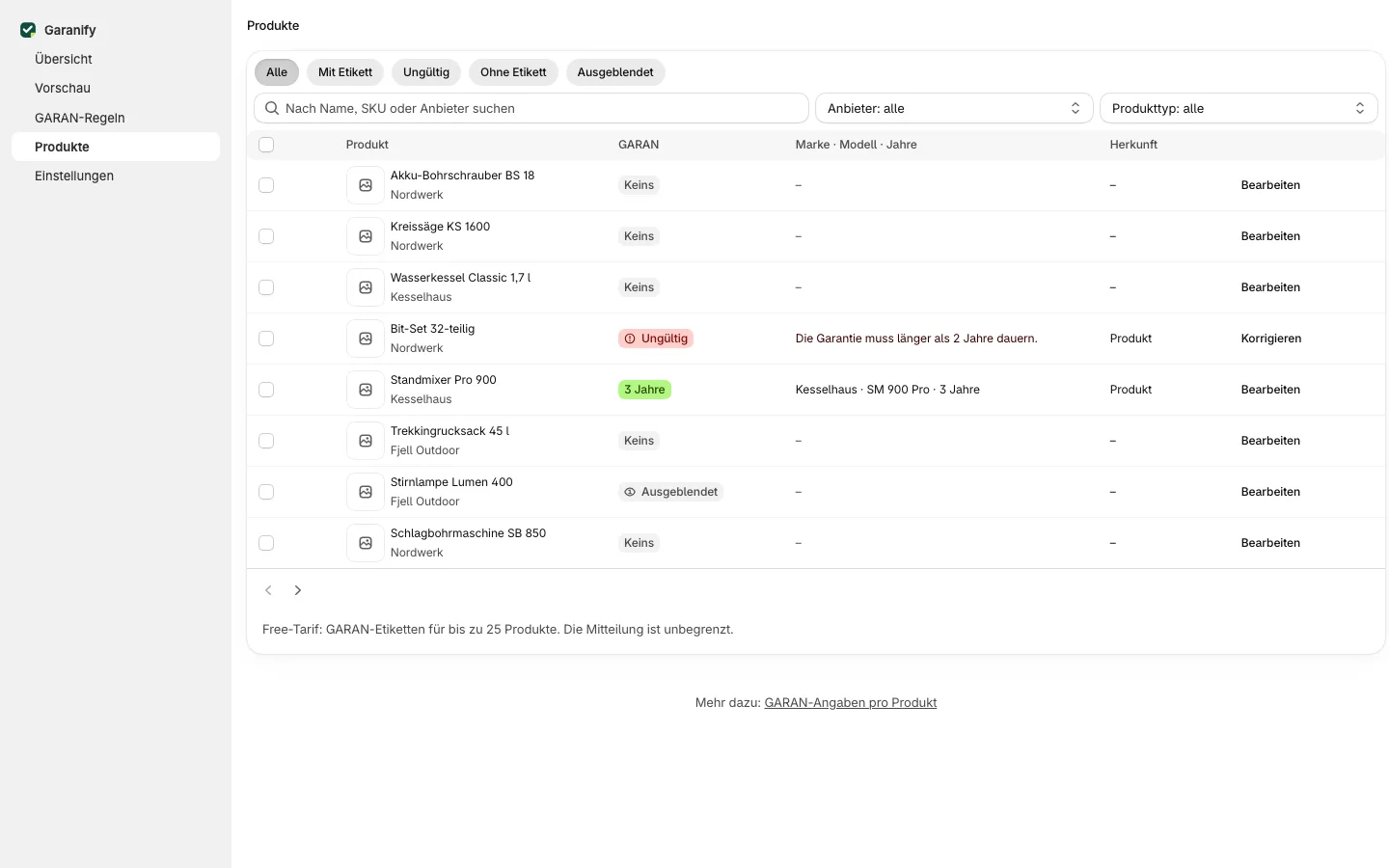
Each row shows the badge, Brand · model · years and the Source (Rule or Product). For invalid details the reason is shown in red and the button reads Fix.
Edit a product
The dialog has the fields on the left and Result in your shop with the label as customers see it on the right.
| Field | Hint when empty |
|---|---|
| Show GARAN label for this product | switch, on by default |
| Producer guarantee | “Empty: rule 2 applies (5 years).”, otherwise “More than 2 years, whole or half years.” |
| Brand | “Empty: vendor “Nordwerk”.” |
| Model identifier | “Empty: SKU of the selected variant (NW-4200). Never the barcode.” |
Save with Save. Garanify stores the details in metafields of the product.
Reasons for “Invalid”
- “The guarantee must be longer than 2 years.”
- “Whole or half years only.” and “At most 99 years.”
- “Brand is missing.”
- “Model is missing: enter it or give the variant a SKU.”
Many products at once
Select rows. The bar “3 selected” offers Set guarantee, Hide label, Show label and Reset details. Set guarantee overwrites the years on the selected products; brand and model stay unchanged.
Export evidence
Below the list, Download evidence as CSV downloads a file: one row per shop language for the notice, with its places in the published theme (product page, cart, footer) and the time since when it has been active that way, and one row per product with GARAN data: SKU, brand, model, years, source and status (active, invalid with reason, hidden). Shopify does not tell apps about theme changes, so Garanify records the time when you open the app or export.
Related questions
Where does Garanify store the details?
In the app’s metafields on the product. You do not need to create metafields yourself.
Why does a product with 5 years show no label?
Usually the brand or the variant’s SKU is missing. The reason is shown in red in the row.
Can I exclude products from the label?
Yes. Switch off “Show GARAN label for this product” in the dialog or use “Hide label”.
What happens above the limit of 25 products?
In the Free plan another product cannot be activated. Existing labels stay; Garanify switches nothing off in the shop.
Sources
Was this article helpful?
What was missing? Send us a short note and we will add it to the article. Send feedback by email
Your choice is not stored or sent anywhere.
Thank you for your feedback. What was missing? Send us a short note and we will add it to the article. Send feedback by email