

PrestaShop Plugin
Set up Garanify in PrestaShop
Last updated 18 November 2026
In short
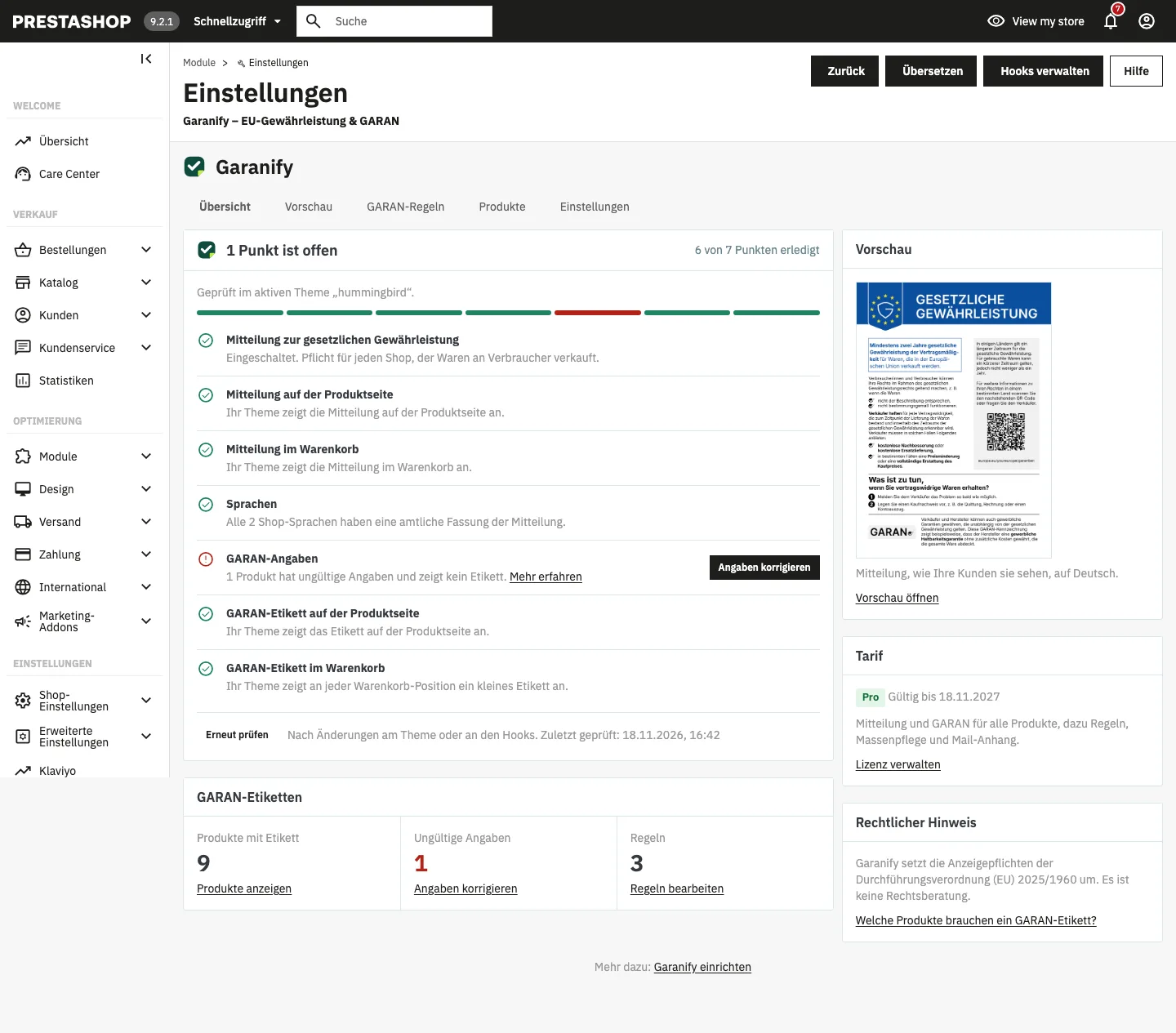
After uploading in the Module Manager you open Garanify via Modules > Module Manager > Configure. The setup guide on the Overview tab checks theme, hooks, languages and GARAN details and shows what is still open. The notice is switched on right away.
Step by step
-
1. Request the ZIP file
Request the ZIP file of the pre-release version (on request, until it is published in the store).
-
2. Upload
In Modules > Module Manager click Upload a module and choose the ZIP file.
-
3. Open
Click Configure next to Garanify.
-
4. Work through the guide
Fix open items on the Overview with their buttons.
-
5. Check
Click Check again and look at product page, cart and checkout in your shop.
Requirements
- PrestaShop 8.1 or newer
- Classic theme or a theme that outputs the standard hooks
Install
Open Modules > Module Manager, click Upload a module and choose the ZIP file. PrestaShop installs the module “Garanify – EU Legal Guarantee & GARAN”.
Open Garanify
In the Module Manager click Configure next to Garanify. The page has the tabs Overview, Preview, GARAN rules, Products and Settings.
The setup guide
The heading sums up the status, such as “1 item is open”, and names the active theme it checked.
| Item | Done when |
|---|---|
| Notice on the legal guarantee | the notice is switched on |
| Notice on the product page | the theme outputs the hook displayProductAdditionalInfo |
| Notice in the cart | the theme outputs the hook displayShoppingCartFooter |
| Languages | all shop languages have an official version |
| GARAN details | no product has invalid details |
Open items have a button such as Register hook, Open instructions or a link to fix details. After changes, click Check again.
Garanify implements the display requirements of Implementing Regulation (EU) 2025/1960. It is not legal advice.
Related questions
Which PrestaShop versions are supported?
PrestaShop 8.1 and newer. The Classic theme is tested.
Does Garanify change my theme?
No. Garanify uses standard hooks. If your theme does not output a hook, the guide says where it is missing.
Do I need a GARAN label?
Only if the producer gives more than 2 years of durability guarantee on the whole product at no extra cost. Every shop needs the notice.
Which backend languages are available?
All 24 official EU languages, following the language of your employee account.
Sources
Was this article helpful?
What was missing? Send us a short note and we will add it to the article. Send feedback by email
Your choice is not stored or sent anywhere.
Thank you for your feedback. What was missing? Send us a short note and we will add it to the article. Send feedback by email