

PrestaShop Plugin
GARAN details per product in PrestaShop
Last updated 18 November 2026
In short
In PrestaShop you maintain years, brand and model directly in the product, Options tab, in the GARAN label block. The Products tab in Garanify shows which products show a label and why others have none. With Pro you change many products at once.
Fields in the product
Open Catalog > Products, choose a product and the Options tab. There you find the block GARAN label (EU manufacturer guarantee):
| Field | Meaning |
|---|---|
| Status in the shop | shows whether and with which values the label appears |
| GARAN label enabled for this product | switch to hide it |
| Manufacturer guarantee in years | only for a free producer guarantee of more than 2 years on the whole product, such as 5 or 7.5. Empty: use rules |
| Brand on the label | empty: the product’s manufacturer |
| Model on the label | empty: MPN, otherwise reference |
The Products tab
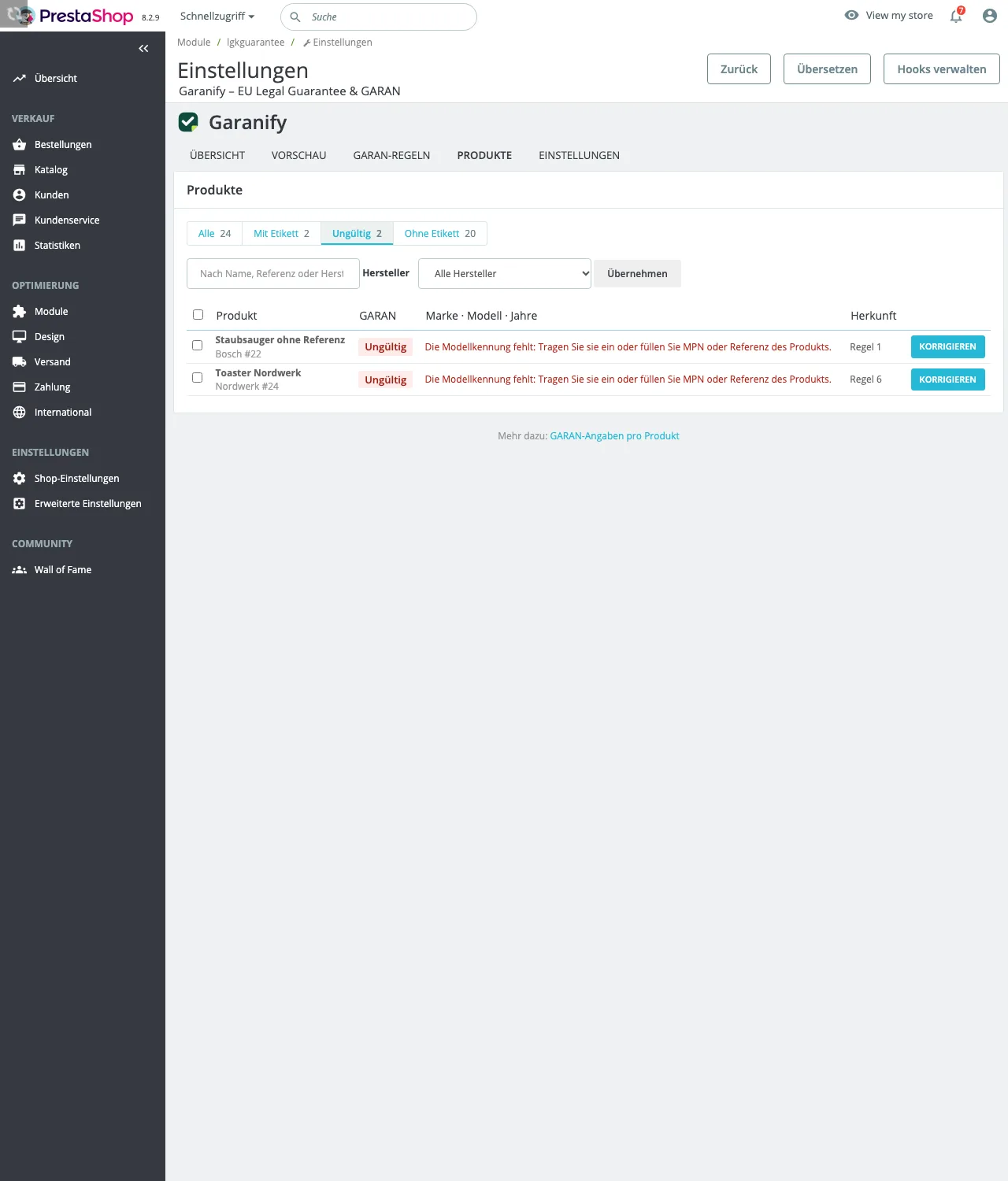
Filter by All, With label, Invalid and Without label, search by name, reference or manufacturer and narrow down by Manufacturer. Each row shows Brand · model · years and the Source. For invalid details the reason is shown in red and the button reads Fix.
Many products at once
Select products and choose under Bulk action: Set guarantee, Hide label, Show label or Reset data. Click Apply.
Export evidence
Export evidence (CSV) in the Products tab downloads a file: one row per shop language for the notice, with the places switched on and the time since when it has been active that way, and one row per product with GARAN data: reference, brand, model, years, source and status (active, invalid with reason, hidden). Keep the file as evidence.
Related questions
Why does a product with 5 years show no label?
Usually the manufacturer, or both MPN and reference, are missing. The reason is in the Products tab and under Status in the shop.
Does Garanify use the EAN as model?
No. Without your own entry, the MPN applies, otherwise the reference.
Do the details apply to combinations?
The fields are on the product and apply to all combinations.
What happens to the details when I delete a product?
Garanify removes the related GARAN details as well.
Sources
Was this article helpful?
What was missing? Send us a short note and we will add it to the article. Send feedback by email
Your choice is not stored or sent anywhere.
Thank you for your feedback. What was missing? Send us a short note and we will add it to the article. Send feedback by email