

Old text rules converted: what happens?
Last updated 18 November 2026
In short
Earlier versions of Garanify kept rules as text lines, such as “Miele=10”. On update, Garanify moves every line once into the new GARAN rules table. Readable lines become normal rules; unreadable ones stay visible as invalid rules with the original text. Nothing is deleted.
What happens on update
- Garanify reads the old text fields once.
- Every readable line becomes a rule in the GARAN rules table, in the same order.
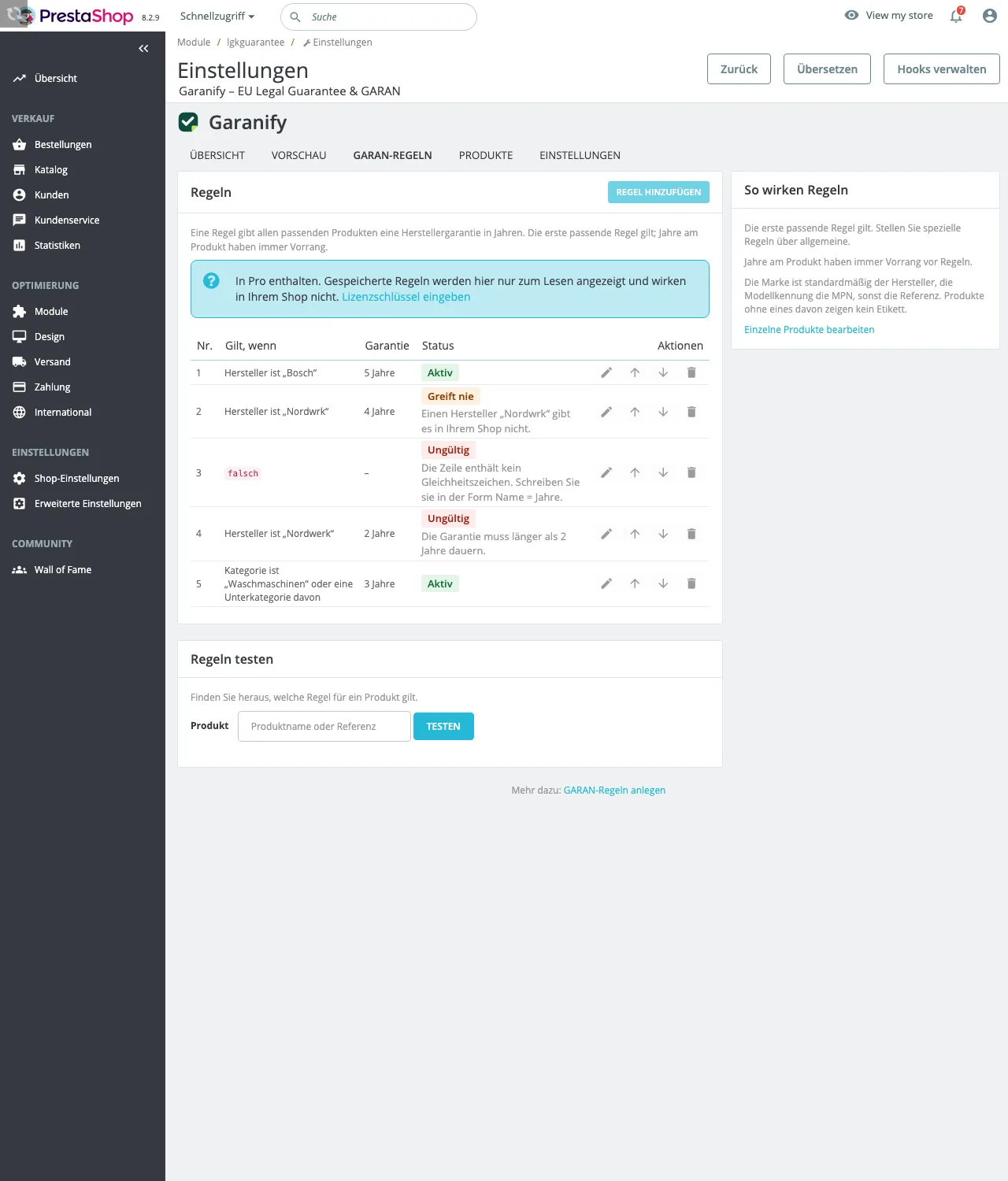
- Unreadable lines stay as a rule with the status Invalid and show the original text.
- The old text fields are no longer used afterwards.
After the update your shop shows the same labels as before, as long as the lines were readable.
Per shop system
| Shop system | Old format | How migrated lines appear |
|---|---|---|
| Shopware 6 | Name = years in configuration text fields | marked as a line from the previous text fields; errors explain the expected format Name = years |
| Shopware 5 | Name=years, one field each for manufacturer and category | Source line shown on the rule. Manufacturer rules come before category rules. |
| PrestaShop | Name = years, one field each for manufacturer and category | The original text appears in red in the Applies if column with the reason. |
| JTL-Shop 5 | type=value;years, such as vendor=Miele;10 | “Unreadable line: …” plus a note in the backend bell |
| WooCommerce | already structured rules | The migration runs without a notice. |
What you should do
- Open the GARAN rules tab and look for rules marked Invalid or Never applies.
- Create invalid lines as a new rule and delete the old one.
- Check names for typos, such as “Nordwrk” instead of “Nordwerk”. Such rules match no product.
- Use Test rules on one product per rule.
Related questions
Do I lose my old rules?
No. Every line is migrated, even unreadable ones. In Shopware 5 the old fields stay in the plugin configuration as a backup.
Do I have to start the migration?
No. It runs on update or when you first open Garanify.
Why does my shop show fewer labels after the update?
Check your plan. Without Pro, rules no longer apply; only details on products do.
Can I keep using the text fields?
No. Changes there have no effect. Maintain rules on the GARAN rules tab.
Was this article helpful?
What was missing? Send us a short note and we will add it to the article. Send feedback by email
Your choice is not stored or sent anywhere.
Thank you for your feedback. What was missing? Send us a short note and we will add it to the article. Send feedback by email